
| Hosting Account Login | Webmail Login | About Sea-Ex   Â
|
|---|
 Complete Website Design and Hosting Packages |
||||
| Â | How to Setup CuteFTP ProCuteFTP uses only three panes to provide site connection view, local disk view, remote view, queue view, and a log view. Tabs toggle between views shared in a pane. Drag 'n Drop items between panes. You can maximize bandwidth throughput, download from multiple sites while uploading or browsing, automatically update Web content and customize data management processes all in one cost-effective application. Download here.1. Open CuteFTP Pro and right click in the 'Site Manager' window. Select 'Add New Site' -> New FTP Site. 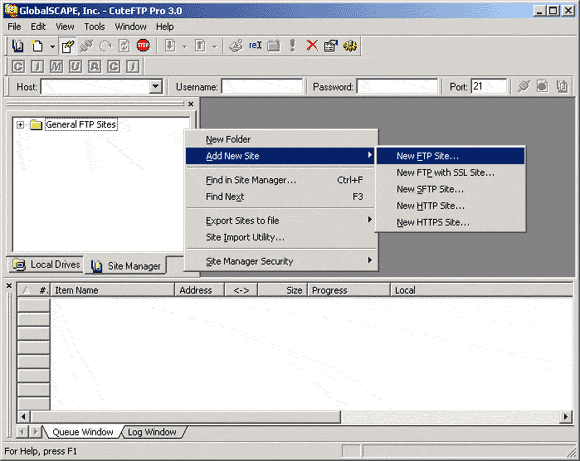 2. Enter a name in the 'Label' Field and 'ftp.seaex.com' in the 'Host Address' field. Enter your Hosting User ID in the 'Username' field and change the 'Login Method' to 'Normal'. 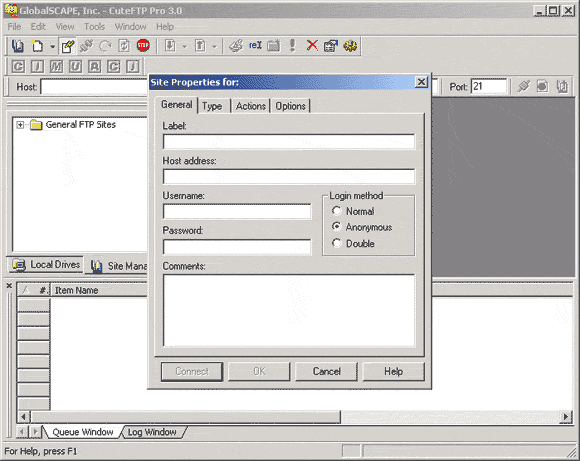 3. Click on the 'Type' tab and change the 'Data connection type' to 'PASV' and click 'Ok'. 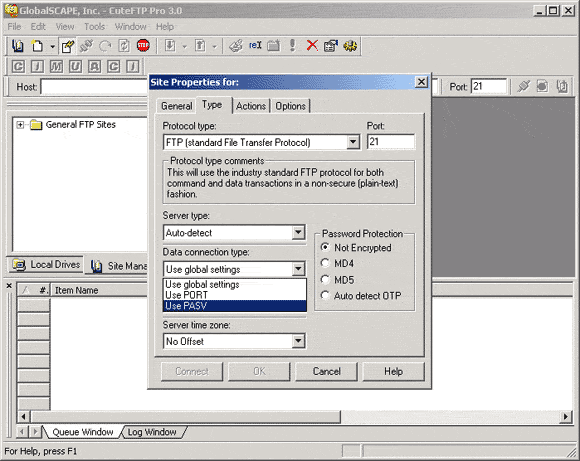 |
 | ||
|
Home | Website Design Services and Packages | Search Engine Optimisation and Search Engine Marketing About Sea Ex | Hosting Account Login | Webmail Login © 1996 -
Sea-Ex Home | FAQ |
||||