
| Hosting Account Login | Webmail Login | About Sea-Ex   Â
|
|---|
 Complete Website Design and Hosting Packages |
||||
| Â | How to Setup UltraeditUltraEdit is a versatile HTML/Text editor with syntax highlighting that can support a wide variety of programming languages. UltraEdit also has FTP support which many other common text editors do not. With UltraEdit is it possible to open and edit your files and save them directly via FTP without having to go through the process of downloading your files with a separate FTP client, edit them and then upload them once again. This might not seem like much of a hassle if you do not update your site often but after a while it becomes a very tedious task if you edit, save & create multiple files a once.To setup UltraEdit with Server101 you will need to create an account by going to FILE --> FTP --> Open from FTP 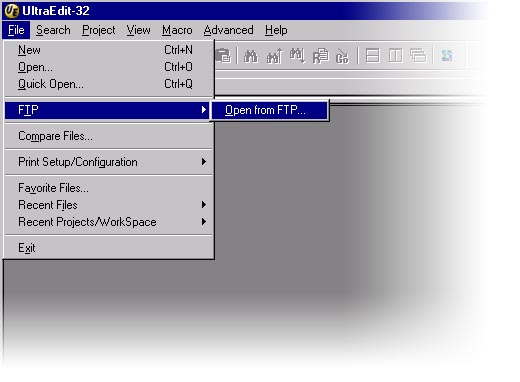 From here enter the following information in the fields shown. 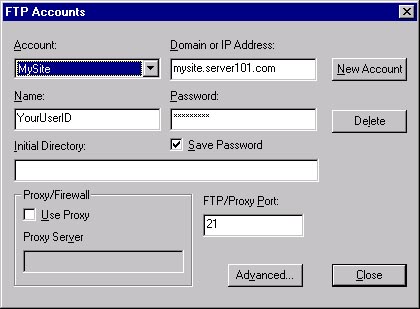 Once you have created your account you can browse your accounts contents and select multiple files to edit. When your comfortable with your changes you can save your modifications. 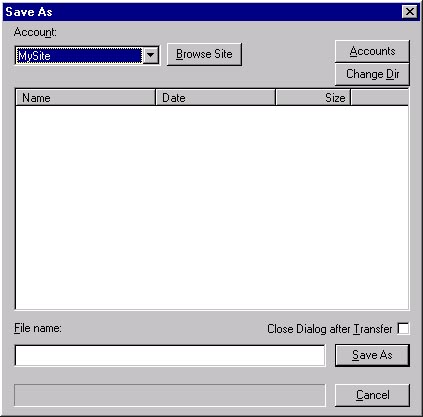 For further information refer to http://www.ultraedit.com or the help file provided with the program. |
 | ||
|
Home | Website Design Services and Packages | Search Engine Optimisation and Search Engine Marketing About Sea Ex | Hosting Account Login | Webmail Login © 1996 -
Sea-Ex Home | FAQ |
||||